
Early in my career, I was fortunate to have a few good managers and mentors. I remember my first manager telling me:
“Donald, if you have to send more than three emails on this, try something else besides another email.”
It was a small piece of advice, but almost twenty years later, I still use it. When a conversation isn’t getting anywhere, sometimes you have to change the approach.
That’s what I mean when I talk about business communication. It’s not just vocabulary — and it’s not as complex as persuasion. It’s knowing when to call someone after a few emails, giving enough background before starting a discussion, and deciding which details belong at the top of a status update and which can wait.
These are skills we use every day, but a lot of people are left to figure them out on their own. In fact, surveys show that almost 100% of office workers experience miscommunication at least once a week.
(https://www.grammarly.com/business/learn/introducing-2024-state-of-business-communication/)
I wanted to help people practice some of these situations before they encountered them at work. So I built a chatbot that could explain a concept as a coach, then play a manager or colleague so the learner could try it out.
(The app is in a live beta with active users as of the writing of this article.)
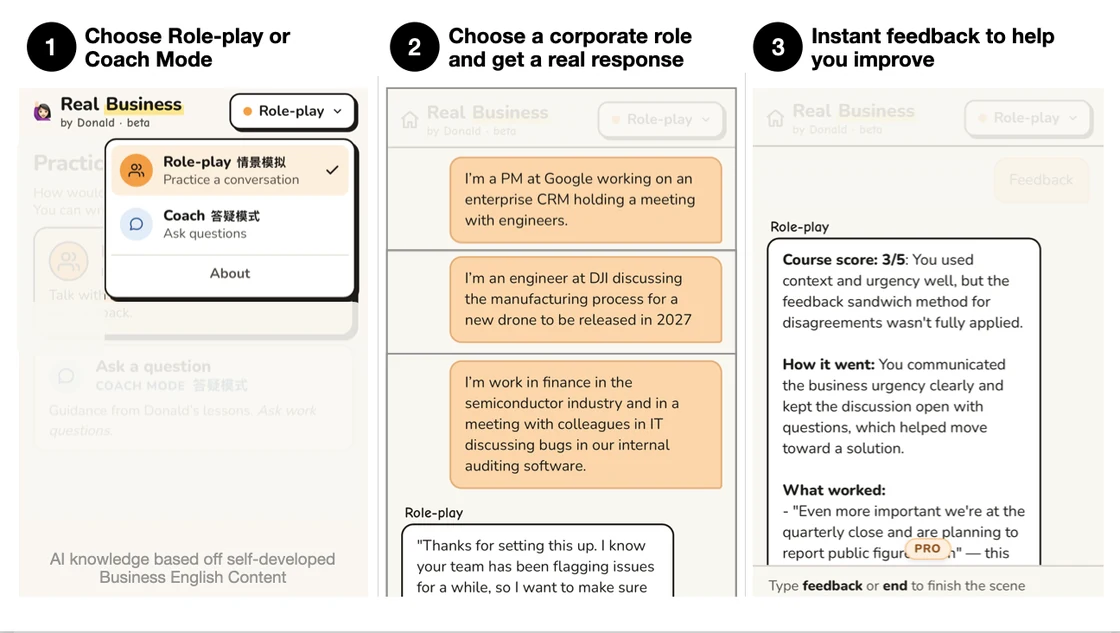
Why build a separate app?
Couldn’t someone just open any AI chat (ChatGPT, Claude, Grok, or even Kimi) and ask it to help them practice business communication?
Yes.
But what do they practice first? How should they progress? When should the AI provide feedback? This is a lot to figure out for someone who may not even know what they need to learn.
A dedicated app lets me provide some of that guidance. A button to switch between coaching and role-play helps learners keep the two modes separate. A vocabulary review gives them somewhere to return to after a conversation. A good design helps teach people how to use the product.
It’s a little like the difference between a command line and a graphical interface (see image below if you’re not familiar). Both can do the same things, but with an interface you spend your attention on the task instead of remembering the commands.
Running an application also lets me review usage logs and improve the experience for everyone. If something goes wrong, I have a better chance of understanding what happened.
But it wasn’t easy.
I started seeing a series of problems I came to think of as drift. The chatbot would drift back into the wrong exercise, drift between coach and colleague, or drift from a rule it was supposed to follow.
A lot of the product development came down to how to manage that drift. What was better managed by the AI, and what was better done in traditional code? And how would I know if a fix actually worked?
Part 1: Watch, don’t listen
I implemented my chat using a type of RAG (retrieval-augmented generation). It’s a lot like placing a bookshelf next to the AI model. The chatbot could retrieve relevant passages and use them when answering a question. The books I placed on the bookshelf were my own “books” — my own course content. How I organized the books and passages (chunking, indexing, etc.) is a technical detail I won’t cover here, but I eventually got the basic scenarios working well enough to put in front of users.
“This is great, I love that it gave me an honest score and left useful feedback even when I didn’t realize I made mistake”.
I was excited to be helping learners again.
Then I looked at usage and saw it dropping off. 😭
When I went through the conversation logs, one problem stood out. The role-play mode offered a few beginner lessons like teaching users “how to start a meeting”. The problem was that advanced learners wanted to practice more custom scenarios like holding a difficult 1:1 with their manager, or discussing technical details in a meeting. When they requested these scenarios, the chat would start off correctly, but drift back to starting a meeting. I could imagine their frustration.
Part 2: Patchwork
At first, the fixes seemed fairly simple. I added a rule for the chatbot to keep the beginner scenarios clearly separated from advanced scenarios and to explicitly allow users to start custom scenarios.
I went through all of the usage in more detail and fixed each problem:
Problem: Non-technical users were encountering technical vocabulary like “firmware”.
Fix: Don’t use technical jargon unless the user used it first.
Problem: Beginners felt the early scenarios were a bit too advanced.
Fix: Always start off easy in the early scenarios and don’t challenge the learner too much.
And so on…
After dozens of fixes I encountered the first major problem: The model would start forgetting some of the rules. It would remember some of the rules some of the time. This wasn’t good enough.
Part 3: Tighten the Ship
The clearest problem was that the chatbot would drift between different modes. It might be a coach one second, then your manager the next. And this confusing experience still happened even though I had told it explicitly never to step out of character unless the learner asked.
So I added a switch controlled by the user. This was managed as a variable in the code — and a hidden tag reminded the chatbot which mode it was in on every turn, instead of leaving it to guess from the conversation.
A similar issue came up with roles. A user might explain their company and role, but the model would mix them up in long conversations. So I had the model recognize when users described their own work and save those details to a database.
I could use traditional code and a database to make sure decisions made by the user persisted instead of having the model try to remember. This fixed the vast majority of these types of issues.
But code could only fix so much. I still had to set rules for a variety of circumstances. An advanced user might want a tough status meeting, then easy practice for a 1:1 with their manager. The list of rules kept growing and growing — the model would continue forgetting and I couldn’t cover every single situation the user might bring up.
Part 4: Letting go
When individual contributors become managers for the first time, some still try to manage everything closely: how the team formats an email, which topics a meeting must cover, how to present to leadership. Once the team grows beyond two or three people, they realize that being this prescriptive doesn’t scale. There’s not enough time to keep track of every detail.
It was the same issue I was running into with AI. I couldn’t manage all of the details:
“If the user response includes A, mention B.”
“If the user response includes C, mention D.”
“If the user is a beginner, give them a shorter response.”
“If the user is advanced, give them more pushback.”
So I did what every manager eventually has to do: set a direction and let go.
I started giving the model more room to interpret what was happening:
“Be a supportive co-worker. The goal is for the learner to practice the method, not to get stuck, so give a hint when they’re struggling. Adjust the difficulty and pushback so the conversation stays challenging but doable.”
Giving the model a reason it could judge, not just a rule to follow, cut the number of rules (and the drifting that came with them). It also let the model handle situations beyond the ones I had defined.
That guidance worked for open-ended practice, but for introductory exercises I still kept strict rules.
My test results were clear (explained more below):
Beginner exercises:
• 2/6 (33%) pass rate with directional guidance.
• 5/6 (83%) pass rate with strict rules.
Advanced learners switching scenes:
• 5/6 (83%) pass rate with directional guidance.
• 1/6 (17%) pass rate with strict rules.
It’s like onboarding a new teammate: give them concrete steps in the first weeks (“meet X, Y and Z”), then a goal they can own as they gain experience (“improve the user experience by year end”).
Evaluation
Letting go also meant that the way I evaluated behavior had to change. Once the model could word things its own way, tests that checked for exact wording stopped making sense.
So I built a small “golden set”: a fixed list of test conversations, each with a check on behavior, such as “did it stay in the scene the learner asked for?”
How the tests worked: both prompts ran the same conversations on the same model, several times each, and yes-or-no tests decided each pass or fail. A second AI model then read the replies, caught problems the checks missed, and proposed prompt fixes, a step toward LLM-as-a-judge.
Summary
I ended up with three levels of control (with some examples):
• Managed in code: preserve mode, save role information
• Explicit instructions for the model: word limits, a fixed feedback format
• Directional guidance: be supportive, offer hints, adjust difficulty based on responses
Understanding these different levels of guidance also made me appreciate the elegance of my manager’s three-email advice. He gave me a strict rule for when to stop, and directional guidance for everything after: it was up to me to decide whether a call or face-to-face conversation would help, and what I would say.
That’s what I hope people take away from this article: When you spot drift in your AI products or mistakes being made on the team, the solution isn’t always more rules. Sometimes it’s to let go and provide directional guidance. You have to find the right balance, and I expect that as AI models improve, it will keep shifting toward directional guidance.